I found this solution in the MSDN forum. I am merely posting it in my blog because I made this mistake twice and also I thought I should just document it here :-)
Problem:
You are building a Visual Studio package and using hosted build server to build your code. When you build you get following error.
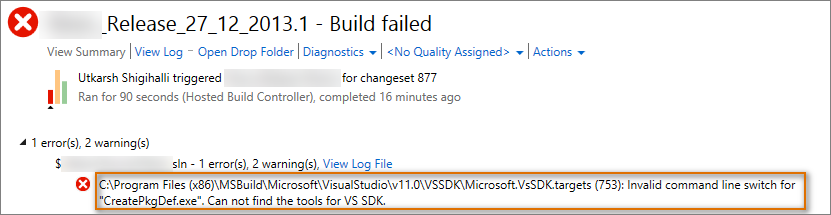
Cause:
I initially thought build server does not have VS SDK installed. However, thanks to the answer by Jeff in this forum question I was able to know the actual cause. I am quoting the below text from the forum answer
The TFS build service runs as a 64-bit process on a 64-bit machine, and the VS SDK always gets installed as 32-bit (to work with Visual Studio). Since the registry key that the build process needs is located under
HKLM\SOFTWARE\WoW6432Node\Microsoft\VisualStudio\VSIP\11.0the 64-bit build process looks for it in the wrong location.
Solution:
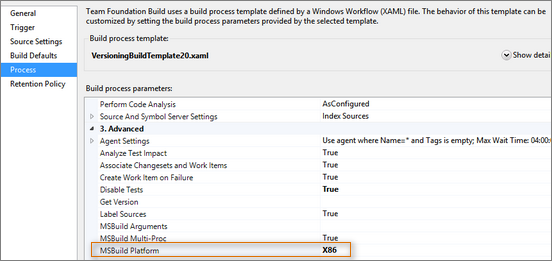
- Open the build definition which is causing the issue and go to “Process” tab
- Under the “Advanced” node, you will see “MSBuild Platform”
- Change it from “Auto” to “X86”